

When you move an object using separate horizontal and vertical inputs, diagonal movement often ends up faster than moving in a single direction.
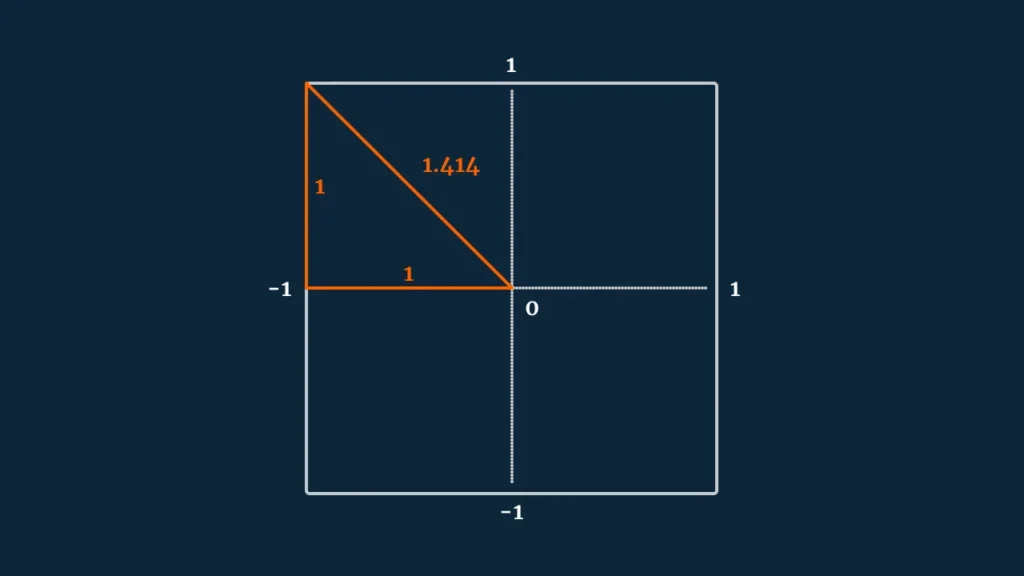
This happens because you’re effectively combining two full-strength inputs at the same time. A forward value of 1 and a right value of 1 don’t just add together—they form a vector whose length is about 1.4. That increase comes directly from Pythagoras’ theorem: the diagonal is the hypotenuse of a right triangle, and it is longer than either side alone.
In practical terms, pressing “forward + right” makes your character move about 40% faster than moving purely forward or sideways. It’s a subtle bug in feel, but it can seriously affect balance and control.
So how do you fix it?
If you’re using Unity’s new Input System, there’s already built-in support for this problem. You can use a composite vector and select either Digital Normalized or Analog mode, which automatically keeps diagonal movement consistent with other directions.
If you’re building movement manually—such as combining Input.GetAxis("Horizontal") and Input.GetAxis("Vertical")—you need to correct the vector length yourself.
One straightforward solution is normalization:
Vector3 movement = new Vector3(x, 0, z).normalized;
This forces the vector to always have a length of 1, ensuring consistent speed in all directions.
However, normalization has a side effect: it removes magnitude information. That means any partial input—like analog stick tilt or Unity’s built-in smoothing on keyboard axes—gets flattened into full-speed movement. Everything becomes either “on” or “normalized to full,” which can feel overly sharp or robotic in games that rely on gradual acceleration.
If you want to preserve those subtler input values, a better approach is to clamp the vector’s magnitude instead:
public float speed = 2;

void Update()
{
    float x = Input.GetAxis("Horizontal");
    float z = Input.GetAxis("Vertical");

    Vector3 movement = new Vector3(x, 0, z);
    movement = Vector3.ClampMagnitude(movement, 1);

    transform.Translate(movement * speed * Time.deltaTime);
}
This keeps diagonal movement from exceeding a length of 1, while still preserving weaker input values. Light joystick tilt still feels slow, full input still feels fast, and diagonal movement no longer breaks your speed balance.
In short: normalization enforces a fixed speed in all directions, while clamping preserves input nuance but prevents diagonal speed boosts.